
On the Zignyl platform, users have 5 different roles and permission sets:
Generally, they correspond with the different roles and functions that they have within the business that is using Zignyl. In this case, the owner or CEO of a large business will have the Company Admin role in our system, and a server or a BOH team member will have the Employee role in our system. This article is to help you understand the different functions of each role in Zignyl and what you can and cannot do.
Employee
Employee Role Overview
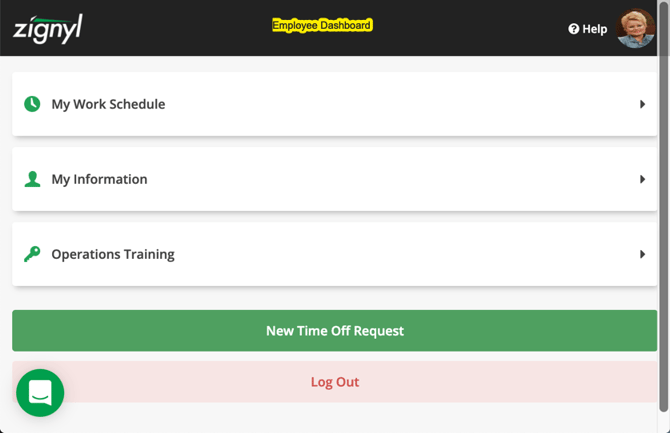
The employee has several major functions and responsibilities when it comes to Zignyl, all of which are straightforward:
-
Ensuring that their own personal, contact, and time information is correct (name, email, address, phone, text message, emergency contact, availability).
-
Clocking in (either via the POS or the Zignyl Clipboard)
-
Completing your Zignyl-assigned tasks
-
Reviewing your schedule, either on your app or on app.zignyl.com
-
Requesting time off and/or changing your availability, also through your mobile app or via app.zignyl.com
-
That being said, employees cannot:
-
Edit their time punches (if you are using Zignyl for time keeping)
-
Edit/delete notes/documents
-
Edit their own Zignyl account access
-
Archive or delete themselves or other users
-
For more on team member/employee usage, please visit this link.
Shift Leader
Shift Leader Role Overview
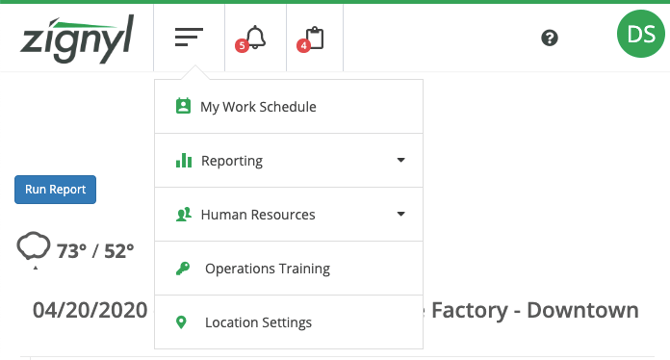
Shift Leaders have increased responsibilities compared to standard employees, with a focus on supervising daily operations. Their main functions include:
-
Monitoring team clock-ins and clock-outs, and reporting or escalating time punch issues via the Clipboard or Management Portal
-
Overseeing task completion during assigned shifts and checking against the Task Completion Report
-
Run Zignyl, Location Performance, Task Completion, and CSV Reports
-
Shift Leaders can view reports (including across stores), sales, task completion, and see who is clocked in.
-
You have access to the user listing for visibility, but cannot edit user profiles.
While Shift Leaders have more access than regular employees, they typically cannot perform high-level administrative tasks (like editing employee records or approving time-off). Their permissions are mostly centered on shift-based operations and reporting rather than company-wide administration.
-
Shift leaders cannot:
-
Edit their own time punches (if you are using Zignyl for time keeping)
-
Access or view any other Zignyl user outside of seeing their name, cell, email, role, and assigned location(s) on the HR User Listing
-
Edit their own Zignyl account access
-
Edit/delete notes/documents
-
-
-
Archive or delete themselves or other users
-
You can reference Zignyl’s Help Center for more on Shift Leader access and reporting here.
Please keep in mind that shift leaders may access the following tabs in app.zignyl.com:
-
My Work Schedule
-
Reporting
-
Human Resources
Beyond those tabs, a shift leader would have to ask their manager to access app.zignyl.com from a browser on their phone or desktop/laptop.
Manager
Manager Role Overview
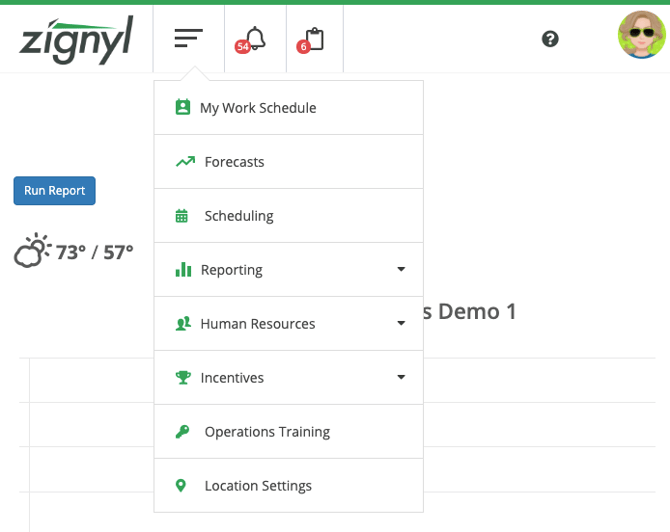
Managers in Zignyl have broad responsibilities and high-level permissions, in addition to what the employee and shift leader level user permission sets entail.Their main functions include:
-
Managing employee schedules and creating shift calendars for their assigned locations.
-
Assigning employees to various locations as long as the Manager is also assigned to that location.
-
Matching users/employees to POS IDs (see this link for more on POS matching).
-
Running and reviewing detailed reports such as Net Sales, Employee Sales, Daily Location, Timesheet Summaries, and Task Completion for one or multiple locations that they are assigned to.
-
Managing specific locations' employees: adding, editing, and maintaining employee profiles, timecards, pay rates, schedule availability, and time off requests.
-
Archiving AND un-archiving Employee and Shift Leaders but cannot delete them.
-
Adding/Editing/deleting notes/documents for those pertinent team members.
-
Viewing and editing forecasts, compensation, and other HR data.
-
Overseeing daily, weekly, and monthly operational tasks for their assigned locations.
-
Note: any personal availability changes or time off requests will have to be approved by their Area Director or Company Admin.
Managers are the lowest permission group that will have individual alerts or tasks assigned to them. In addition, managers have authority to make corrections to time punches, approve and manage time off or schedule changes, and generally oversee more operational and some administrative functions within their location(s). This is in contrast to shift leaders, whose permissions are limited to operational oversight and reporting without direct administrative capabilities.
Please keep in mind that managers may access the following tabs in app.zignyl.com:
-
My Work Schedule
-
Forecasts
-
Scheduling
-
Reporting
-
Human Resources
-
Incentives
-
Location Settings
With regards to Location Settings, managers can update some general information, customize weekly schedules, create dashboard alerts, and see assignments. However, making changes to store admin-level settings (like admin credentials, global location policies) usually requires Area Director or Company Admin approval. Please keep in mind that assigning managers to additional locations requires an Area Director or Company Admin to do so in the Zignyl Management Portal (e.g., manager 1 works at store A, but recently got assigned to store B; area director 2 would have to manually add a location to manager 1's profile in Zignyl) via HR -> User Listing -> User -> Operations .
-
Managers cannot:
-
Change key Zignyl store admin settings or location tasks.
-
Edit their own time punches (if you are using Zignyl for time keeping).
-
Managers cannot edit Information on Area Directors, Company Admins, or other Manager's Zignyl profiles.
-
Managers can archive Employee and Shift Leaders but cannot Delete them.
-
Managers cannot archive or delete their own Zignyl Profile, other Managers, Area Directors and Company Admins.
-
If you are a manager, please contact support@zignyl.com or your Company Admin for assistance on your own access.
Area Director
Area Director (AD) Role Overview
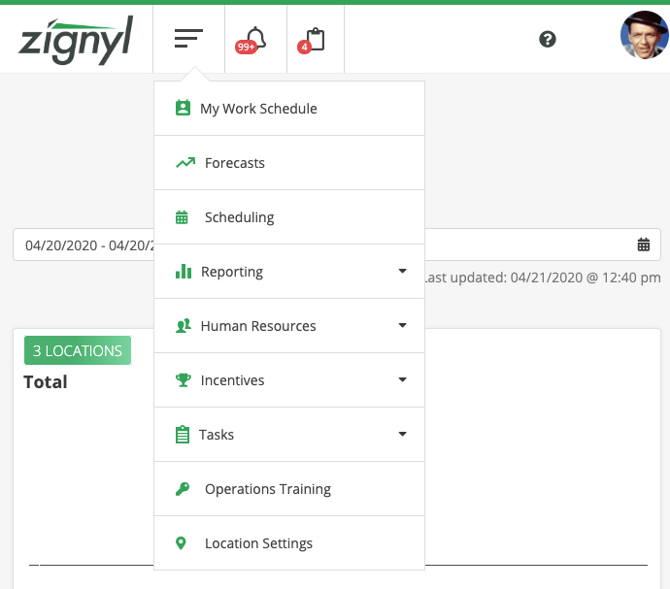
Area Directors in Zignyl are assigned to oversee specific locations or regions. Their permissions are advanced and include everything from employee and shift leader to manager, but limited to the stores they are explicitly assigned to. Once a Company Admin assigns an Area Director a group of stores, their abilities, permissions, and responsibilities include, but are not limited to, what is listed below:
-
Accessing the Admin Settings tab for their assigned stores, which covers Payroll/Work Week, Forecasts, Scheduling, and POS Matching settings.
-
Area Directors can approve/deny Time Off Request and Availability request for Managers/Shift Leaders and Employees.
-
Conduct HR functions (promote/demote/document/approve availability/terminate) for all users below their access/permission group.
-
Area Directors can only Archive Employees and Shift leaders of the locations over which they are assigned to.
-
Set and schedule dollar-amount incentives (see more here).
-
Modifying payroll parameters (work week, period, overtime rules) for their assigned locations.
-
Setting and managing forecasts and schedules for their stores, including notifications and compliance tracking.
-
Viewing and managing the staff list, but only within their assigned stores.
-
Creating, editing, or deleting store-specific location tasks.
However, Area Directors cannot:
-
Edit the pay or administrative settings of other Area Directors; their scope is limited to subordinates within assigned locations.
-
Approve time off or availability requests for themselves or equal/higher-permission users.
-
Modify stores or users outside of their assigned purview - if they are missing stores, they must contact a Company Admin or the Zignyl Team.
ADs are critical for operational oversight at the regional level but operate within boundaries set by Company Admins. If you are an Area Director and need assistance, please reach out to your Company Admin or Zignyl via email.
Company Admin
Company Admin Role Overview
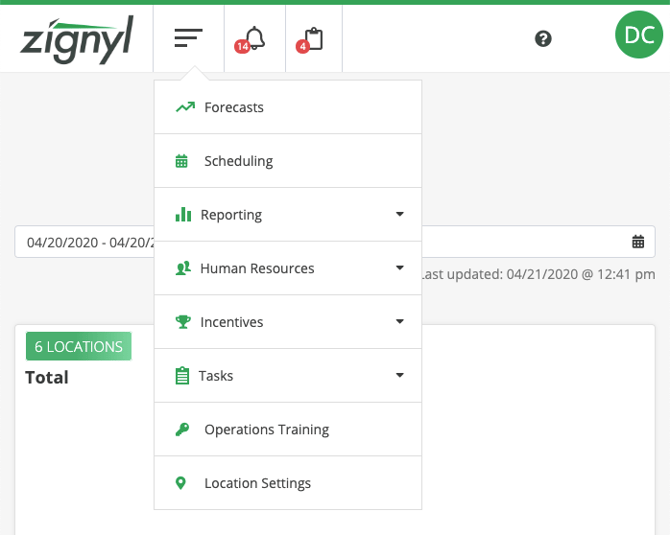
Company Admins (CAs) in Zignyl have the highest level of access and oversight across all store locations within a company. Their permissions encompass system-wide administrative settings, location management, and full employee control. Core CA capabilities include:
-
Accessing and updating Location Settings for any assigned store, including general info, dashboard alerts, custom work weeks, and store-specific hours.
-
Modifying all Admin Settings—such as Payroll/Work Week schedules, Forecasts, Scheduling, and POS Matching—for all stores under their purview.
-
Incentives: CAs can create, modify, and assign incentive pay or bonuses company-wide or for specific locations.
-
Tasks: CAs can create, edit, assign, and track tasks at both the location and company level, including monitoring completion and task compliance.
-
Managing all staff: adding, editing, and archiving employee profiles, assigning permissions, and conducting bulk updates across multiple locations.
-
Running comprehensive company-wide and location-level reports (Net Sales, Employee Sales, Timesheet, Task Completion) to monitor performance.
-
Approving, adjusting, and tracking time-off requests, availability, pay rates, and document uploads for all personnel.